Overview
This guide covers the resources available to help you integrate your application with the Orion Client Library:
- Demo Applications
- Demo Source Code
- Application Development Guide
Demo Applications
First, download and install the appropriate client library SDK — Java or C/C++ — from the Downloads tab of the My Account page in the Product Portal. Once installed, the SDK’s root directory contains ‘demo’ and ‘test’ folders whose code gives you a head start on integration.
Whether you’re coding in Java or C/C++, the HybridAPIDemo Java application in the ‘demo’ directory of the Java client SDK is a good way to get acquainted with the Orion client API. Even if you aren’t integrating in Java, this demo grounds the Orion licensing concepts in an end-user integration and lets you experiment with licensing parameters without writing any code.
Step One
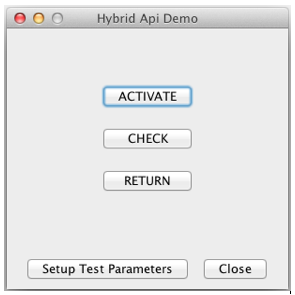
After launching the application, click the ‘Setup Test Parameters’ button.
Step Two
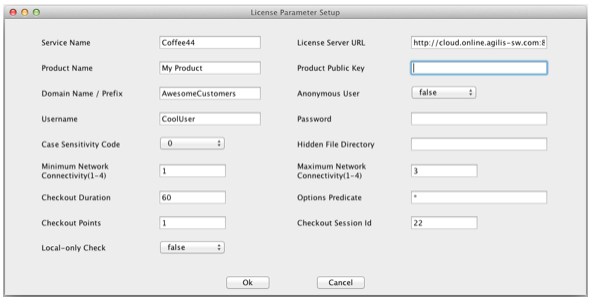
On the License Parameter Setup screen, enter the information for your Orion service, then click ‘Ok’.
Step Three
From here, you can (1) activate a license for the user by communicating with the Orion server, (2) check the local activation record after a successful activation, and (3) return the license to activate it on another machine without vendor support.
Demo Applications (Continued)
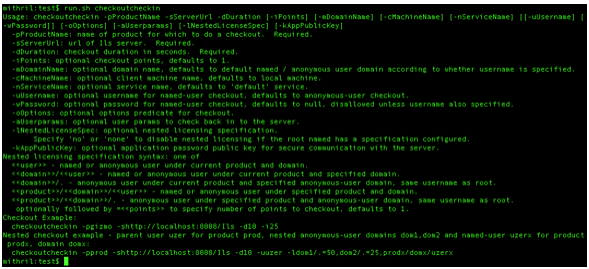
Another useful demo is the ‘checkoutcheckin’ ad-hoc command-line program, available with both the Java and C/C++ client SDKs. It lives in the SDK’s ‘test’ folder (for C/C++, navigate beyond ‘test’ into the ‘bin’ directory, which is further organized by platform). It runs ad-hoc checkouts and checkins of varying complexity against the license server — useful for trying out licensing configurations and learning how to integrate checkouts and checkins into your own application.
Demo Source Code
Source code is provided alongside the binaries for each demo, so you can see how the API calls are made and picture how you might integrate the client library with your own application. For the Java SDK, source and binaries live together in the ‘demo’ and ‘test’ folders. For the C/C++ SDK, the source lives under ‘demo/src’ or ‘test/src’.
Build support is also provided. The Java SDK includes a ‘buildall’ script in the ‘test’ and ‘demo’ directories. The C/C++ SDK includes a build directory at ‘demo/build’ or ‘test/build’ (further organized by platform) with the makefiles used for the original builds.
Application Development Guide
Beyond the demo and test code, spend some time reviewing the client library documentation, which walks you through license-enabling your product for the Orion license server. Focus on the ‘Application Development Guide’ section of the Java or C/C++ Client SDK documentation. Links to the documentation are in the ‘Resources’ tab of the My Account page of the Product Portal.
Next Steps
After working through the demos, reviewing the source code, and reading the documentation, you should have a solid grasp of how to integrate your application with the Orion license server. Recommended high-level next steps:
- Define your requirements
- Identify the demo application closest to your use case
- Model the integration using the demo source code as a head start
- Configure the appropriate licenses in the license server using the administration UI
After completing these steps, you should be well on your way to a successful application integration with the Orion license server.